|
|

PsiLoc...
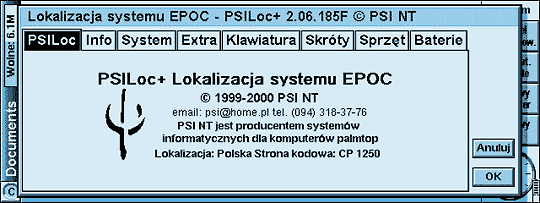
PsiLoc is a package that fully integrates with the system and uses many features of the EPOC platform. Compatibility with the system's interface style and its intuitive design give the programme a unique charm and easiness of use. PsiLoc is not only fully configurable, but it also replaces and enhances many functions of the system. After installing and launching, PsiLoc seems to become a unity with the system, and after some time you will not be able to imagine your Psion working without it.
PSILoc+ awarded a Geek.Com Pick !

Milan Tjioe did a great review of PSILoc+ !
The programme's features...
PsiLoc lets the system integrate better with its user, gives many useful functions and allows for full or partial localisation of the system.
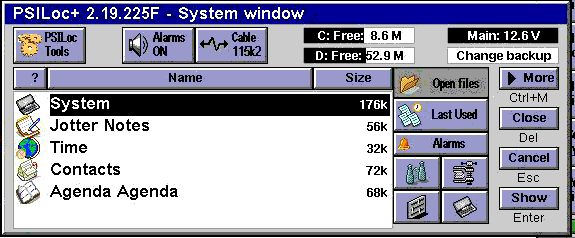
PsiLoc is a shell for the EPOC system. It gives the user different possibilities to control the system, run applications, control the memory, the batteries, alarms and other settings. The methods of setting the options can be adjusted according to the user's preferences.
Thanks to PsiLoc you really get your Psion in your hand!
PSILoc+ is available in two versions: LITE and PRO. The LITE version does not have a few advanced options of the programme, and allows for running only one additional module: a "full" localisation. The PRO version, apart from the built-in functions, allows additional modules as well:
- full EPOC system localisation module (the module depends on the computer it is installed on - currently there are versions available for all the machines using the EPOC system)
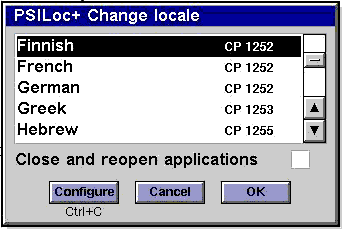
additional code pages module: font sets - there are fonts available in the most popular code pages: CP 1250, CP 1251, CP 1252, CP 1253, CP 1254, CP 1255, CP 1256, ISO 8859-2), as well as keyboard drivers.
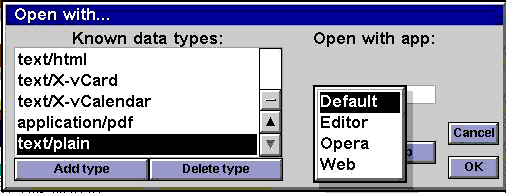
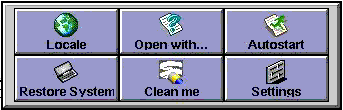
"Open with..." module - makes it possible to link data files with a chosen application (like in MS Windows)
- "EPOC Today" module - general information from Contacts, Email and System applications
- "Extras Bar" module - replaces the standard Extras bar by introducing such features as: shortcuts to folders, files and macros, and seven additional panels
- "Internet" module
- "Set System" - allows for restoring the System application and the EPOC system settings after a computer reset
- "Backup Server" module - all the applications, not only documents, are automatically run after a data backup thanks to this module
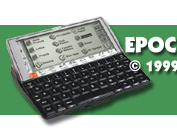
PSILoc+ has been designed to fully use (and extend) the capabilities of the EPOC32 system's ER5 version (machines: Series5MX, Revo, Revo Plus, Netbook, Series7, Ericsson MC218). It is also available, as a stand alone version, for the machines using older versions of the EPOC system (Series5, Oregon Osaris, Geofox One) - this version however does not have a few (technically impossible to implement) functions.
PsiLoc's functions in digest...
- Full or partial localisation of the EPOC system (optional);
- Easy and easily adjustable use of non-standard national characters (e.g. with a prefix or with Shift);
- Smooth switching between keyboard sets or code pages (only in PRO version);
- Keyboard defined by the user (only in PRO version);
- Possibility to change the code page, e.g. CP 1250, CP 1251, CP 1252, ISO 8859-2 (only in PRO version);
- System settings restoration after a reset (only in PRO version);
- Restarting all or chosen applications and documents after a reset (only in PRO version);
- Possibility to create shortcuts between any group of documents and applications working with them;
- Additional functions fully configurable;
- Constant memory compression;
- Data files compression (only in PRO version);
- Alarm sounds switch-off for a given period of time;
- Freezing the touch screen for cleaning;
- Replacing the system's open files list with a multifunctional PsiLoc window;
- Easy access to alarms, link, previously used files, memory and battery information from the PsiLoc window;
- Easy application shortcuts set-up;
- Additional quick launch buttons for CapsLock, link and PsiLoc window;
- Quick timer setting;
- Enhanced file search function - with date, size and file type (only in PRO version);
- Enlarged list of previously used files;
- List of the coming alarms (also from the Agenda);
- Overall system information;
- Linking data files with applications - "Open with..." function, known from Windows systems (only in PRO version);
- Status icons: CapsLock, battery, link, keyboard set and code page;
- Current national characters (code page) preview;
- Possibility to run all the applications, not only files, after a backup (only in PRO version);
Manual...
A detailed description of the programme's functioning and its features can be found in the
manual (in PDF format), either in Polish or in English.
How to buy?
If you are interested in purchasing the programme, please visit our Internet store.
Simulation showing how PsiLoc+ v2.06 PRO works.
For those who are interested, we have prepared a simulation showing how PsiLoc+ v2.06 PRO works on a Psion Series5mx. It includes screenshots with active areas and behaves (almost :-)) like the programme installed on a computer. Due to its size (almost 40 pages) it requires a relatively fast connection. The impatient can have a look at a few screenshots from Psion Series5mx and Psion NetBook machines.
Click the desired bookmark - this way you will run PsiLoc+ v2.06 PRO presentation.
|